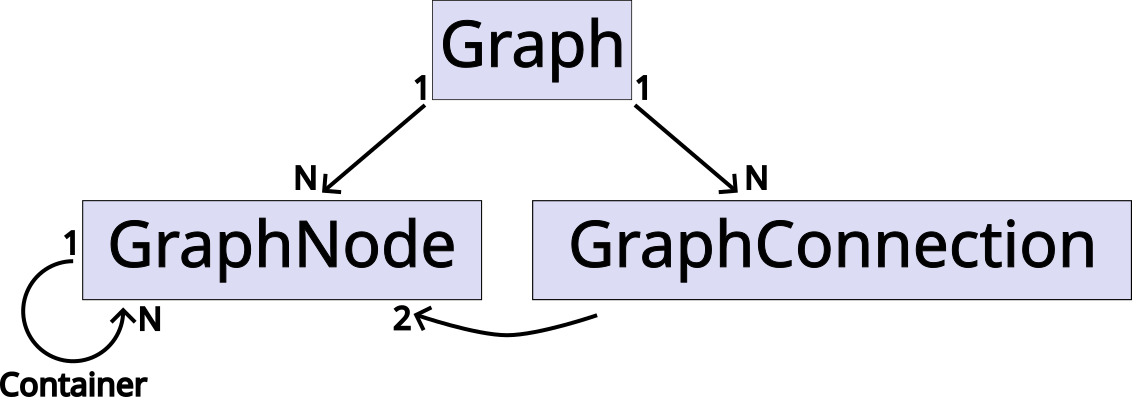
A graph represents the root widget for all Zest models and contains both edges
and vertices. Both elements are added automatically to the graph when creating
new instances of either GraphConnection (for edges) and GraphNode (for
vertices), using the graph as constructor argument.
Vertices can either be simple nodes or subgraphs, which themselves can contain additional vertices.
Graph Viewer
Alternatively, graphs can also be created using the JFace structured viewers. Edges and vertices are created by supplying a special ContentProvider and can be stylized by a special LabelProvider.
Content Provider
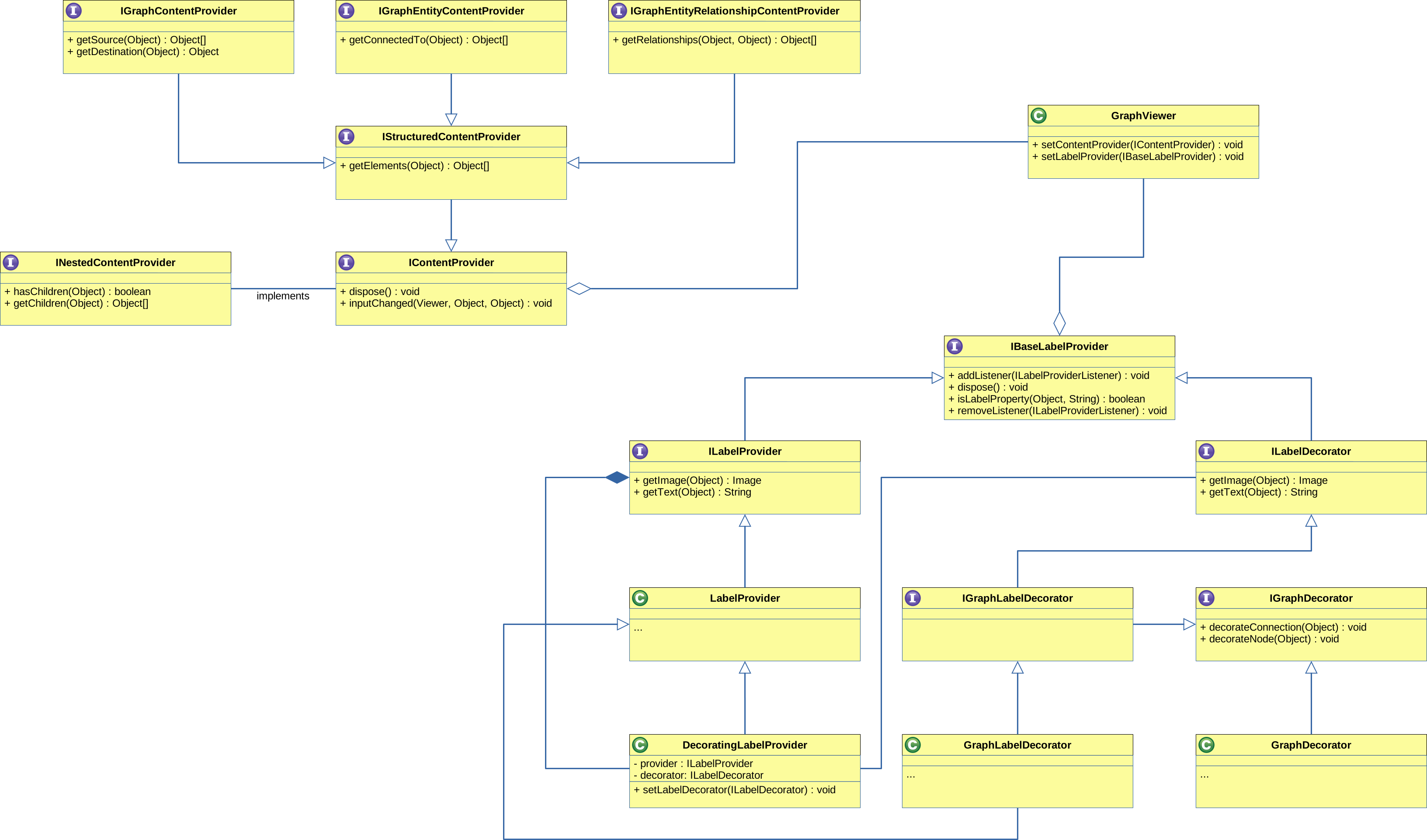
The content provider may implement one (but not multiple) of the following interfaces:
-
IGraphEntityContentProviderfor graphs based on vertices. This content provider returns all vertices contained by this graph and for each vertex, the vertices it is connected to. -
IGraphEntityRelationshipContentProviderfor graphs based on edges. This content provider returns all edges contained by this graph. The union of all source and destination vertices define the vertices contained by this graph. -
IGraphContentProviderfor graphs based on pairs of vertices. This content provider is similar to theIGraphEntityRelationshipContentProviderwhere each pair represents an edge between a source and destination vertex. -
ITreeContentProvider, for hierarchical graphs. A vertex is only connected to its children, which themselves are represented as containers.
Additionally, the content provider may implement the INestedContentProvider
interface (except the ITreeContentProvider) to support sub-graphs.
Label Provider
A custom label provider may either implement the ILabelProvider or the
ILabelDecorator interface. The ILabelProvider should primarily be used for
simple graph items consisting of only a label and an image. For further
stylization, this label provider may also implement the IColorProvider and
IFontProvider interfaces.
If a more complex stylization is required, the IGraphLabelDecorator interface
should be used. Whenever a new graph item is created, the decorateNode and
decorateConnection methods are called to allow full customization of the
underlying widget.
Zest provides the following decorators for common use cases:
-
ConnectionStyleDecorator(Edges only) for contributing details about an edge. -
EntityConnectionStyleDecorator(Edges only) for contributing details about an edge. Here the edge is described via the source and destination vertices. -
EntityStyleDecorator(Vertices only) for contributing details about a vertex.
Additionally, the label provider may implement the IFigureProvider interface
to supply custom figures for the graph elements.
If both a label provider and decorator are required, a DecoratingLabelProvider
can be used.
Example:
class MyGraphContentProvider implements IGraphContentProvider {
	...
}

class MyGraphLabelProvider extends LabelProvider {
	...
}

class MyGraphDecorator extends GraphDecorator {
	...
}

GraphViewer viewer = new GraphViewer(parent, SWT.NONE);
viewer.setContentProvider(new MyGraphContentProvider());
viewer.setLabelProvider(new DecoratingLabelProvider(new MyGraphLabelProvider(), new MyGraphDecorator()));
viewer.setInput(new Object());
Graph Node
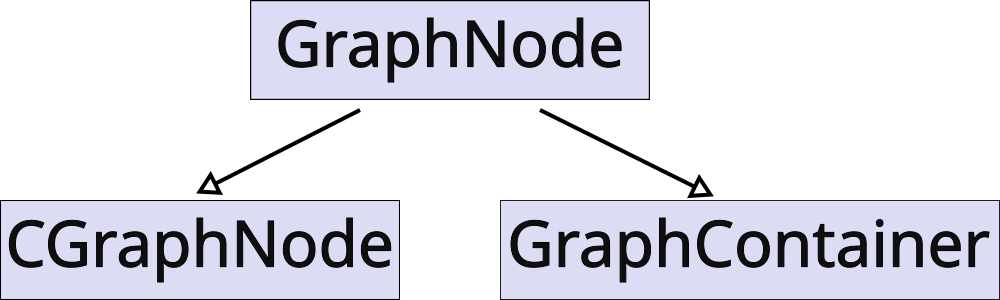
Each vertex is implemented by a GraphNode and backed by a _model figure for visualization. Available classes are:
-
GraphNodeis the default implementation used for vertices where the attributes are defined by the widget. -
CGraphNodeis a custom implementation used for vertices where the attributes are defined by the underlying figure. -
GraphContaineris the default implementation used to visualize subgraphs.
"Hide Node" Feature
When the graph has been created with the "hide node" feature enabled, the model figure is contained by a node figure, providing additional decorations such as a hide and reveal button.
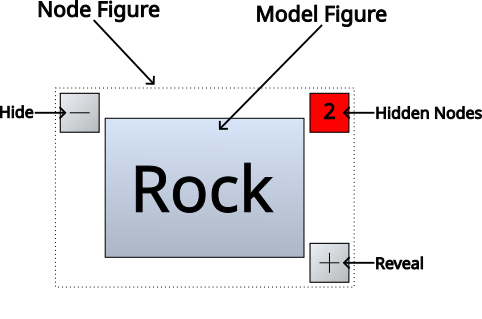
As the name suggests, the hide button will hide the node from the graph, while the reveal button reveals all connected, hidden vertices. The number describes how many adjacent vertices are current hidden.
|
Note
|
If this feature is disabled, the model figure and node figure are identical. |
Graph Connection
Each edge is implemented by a GraphConnection and connects two GraphNodes. The shape of this connection can be customized using the ConnectionRouter from Draw2D.
|
Note
|
Graph connections are always added to the Graph, regardless of whether the node are inside a sub-graph. This means that it is possible to e.g. connect two vertices in separate sub-graphs. |
HighDPI Support
The Figures used for visualization of the GraphItems are painted
using absolute coordinates. In combination with fractional scaling, this may
result in rounding errors, causing visual glitches in the graph.
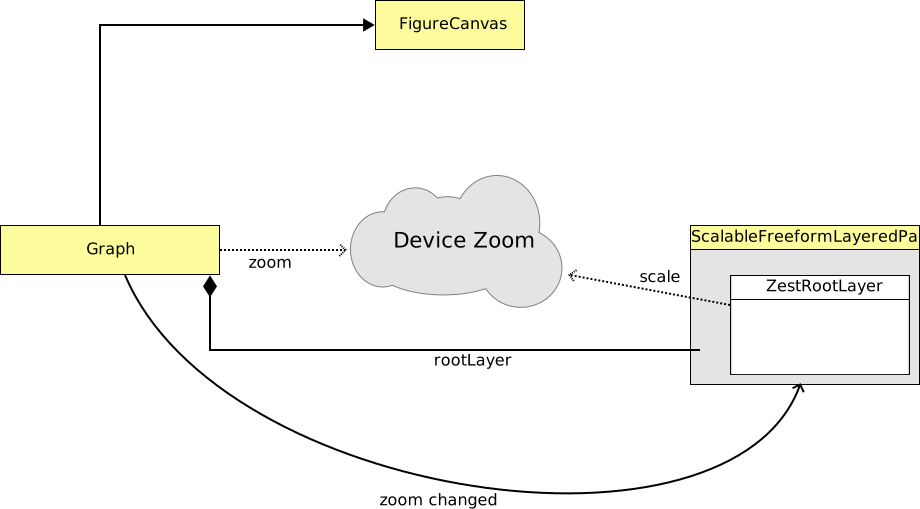
By setting the draw2d.enableAutoscale system property to true, the
native scaling capability of the underlying Graph, which is normally
provided by SWT, is replaced by a Draw2D-based scaling.
When a Graph is created, a ZoomChanged listener is registered. The
current monitor zoom (and any changes to it) is used as scale for the
RootLayer.
|
Note
|
Fractional scaling is currently only supported for Windows, where this system property is enabled by default. On Linux and MacOS, this system property is ignored. |